
Here are notes about how to deploy StarRocks with IAM enabled.
Below commands are executed by AWS’s CloudShell.
1. Download eksctl
Download from: https://eksctl.io/installation
# for ARM systems, set ARCH to: `arm64`, `armv6` or `armv7`
ARCH=amd64
PLATFORM=$(uname -s)_$ARCH

curl -sLO "https://github.com/eksctl-io/eksctl/releases/latest/download/eksctl_$PLATFORM.tar.gz"

# (Optional) Verify checksum
curl -sL "https://github.com/eksctl-io/eksctl/releases/latest/download/eksctl_checksums.txt" | grep $PLATFORM | sha256sum --check

tar -xzf eksctl_$PLATFORM.tar.gz -C /tmp && rm eksctl_$PLATFORM.tar.gz

sudo mv /tmp/eksctl /usr/local/bin
2. Create EKS cluster
I create a EKS cluster named smith-eks.
eksctl create cluster --name smith-eks --region us-west-2About 10~20 minutes later, the EKS cluster will be ready.
3. Configure kubectl config
aws eks update-kubeconfig --region us-west-2 --name smith-eksThen we can use kubectl connect with EKS cluster.
Check all nodes are alive:
$ kubectl get nodes
NAME                                           STATUS   ROLES    AGE     VERSION
ip-192-168-31-98.us-west-2.compute.internal    Ready    <none>   5m17s   v1.30.2-eks-1552ad0
ip-192-168-79-119.us-west-2.compute.internal   Ready    <none>   5m25s   v1.30.2-eks-1552ad0
4. Deploy StarRocks by Helm
Download Helm first: https://helm.sh/docs/intro/install/
curl -fsSL -o get_helm.sh https://raw.githubusercontent.com/helm/helm/main/scripts/get-helm-3
chmod 700 get_helm.sh
./get_helm.sh
Deploy StarRocks by Helm: https://docs.starrocks.io/docs/deployment/helm/
helm repo add starrocks https://starrocks.github.io/starrocks-kubernetes-operator
helm repo update
helm search repo starrocks

# check with heml search
$ helm search repo starrocks
NAME                            CHART VERSION   APP VERSION     DESCRIPTION
starrocks/kube-starrocks        1.9.8           3.3-latest      kube-starrocks includes two subcharts, operator...
starrocks/starrocks             1.9.8           3.3-latest      A Helm chart for StarRocks cluster
starrocks/operator              1.9.8           1.9.8           A Helm chart for StarRocks operator
starrocks/warehouse             1.9.8           3.3-latest      Warehouse is currently a feature of the StarRoc...

# install StarRocks
helm install starrocks starrocks/kube-starrocks
5. Resolve pods always pending
You will find your pods are always pending because of lack resources, you can check it with kubectl describe pod <pod-name> .
# FE always pending
$ kubectl get pods
NAME                                      READY   STATUS    RESTARTS   AGE
kube-starrocks-fe-0                       0/1     Pending   0          26s
kube-starrocks-operator-d59c86c95-5hhfd   1/1     Running   0          30s

# check with kubectl describe pod <pod-name>
$ kubectl describe pod kube-starrocks-fe-0
# ...
# ...
# ...
Events:
  Type     Reason            Age   From               Message
  ----     ------            ----  ----               -------
  Warning  FailedScheduling  82s   default-scheduler  0/2 nodes are available: 2 Insufficient cpu. preemption: 0/2 nodes are available: 2 No preemption victims found for incoming pod.
6. Custom values.yaml
We have to custom values.yaml , to reduce FE/BE’s resource requests.
Default values.yaml can be download from: https://raw.githubusercontent.com/StarRocks/starrocks-kubernetes-operator/main/helm-charts/charts/kube-starrocks/values.yaml
Change resources.requests fields, I’ve reduce cpu→1. You have to change FE & BE both.
resources:
  requests:
    cpu: 1
    memory: 4Gi
7. IAM binding
We have to bind IAM role to pod, so we can access S3/Glue in StarRocks.
https://eksctl.io/usage/iamserviceaccounts/?h=eksctl#usage-without-config-files
$ eksctl utils associate-iam-oidc-provider --cluster=smith-eks --region=us-west-2 --approve
2024-09-09 09:15:36 [ℹ]  will create IAM Open ID Connect provider for cluster "smith-eks" in "us-west-2"
2024-09-09 09:15:36 [✔]  created IAM Open ID Connect provider for cluster "smith-eks" in "us-west-2"

# Here just bind S3 read-only policy
$ eksctl create iamserviceaccount --region=us-west-2 --cluster=smith-eks --name=sr-service-account --namespace=default --attach-policy-arn=arn:aws:iam::aws:policy/AmazonS3ReadOnlyAccess --approve
2024-09-09 09:17:00 [ℹ]  1 iamserviceaccount (default/sr-service-account) was included (based on the include/exclude rules)
2024-09-09 09:17:00 [!]  serviceaccounts that exist in Kubernetes will be excluded, use --override-existing-serviceaccounts to override
2024-09-09 09:17:00 [ℹ]  1 task: {
    2 sequential sub-tasks: {
        create IAM role for serviceaccount "default/sr-service-account",
        create serviceaccount "default/sr-service-account",
    } }2024-09-09 09:17:00 [ℹ]  building iamserviceaccount stack "eksctl-smith-eks-addon-iamserviceaccount-default-sr-service-account"
2024-09-09 09:17:01 [ℹ]  deploying stack "eksctl-smith-eks-addon-iamserviceaccount-default-sr-service-account"
2024-09-09 09:17:01 [ℹ]  waiting for CloudFormation stack "eksctl-smith-eks-addon-iamserviceaccount-default-sr-service-account"
2024-09-09 09:17:31 [ℹ]  waiting for CloudFormation stack "eksctl-smith-eks-addon-iamserviceaccount-default-sr-service-account"
2024-09-09 09:17:31 [ℹ]  created serviceaccount "default/sr-service-account"
eksctl will create IAM roles automatically, you can edit role’s policy by yourself.
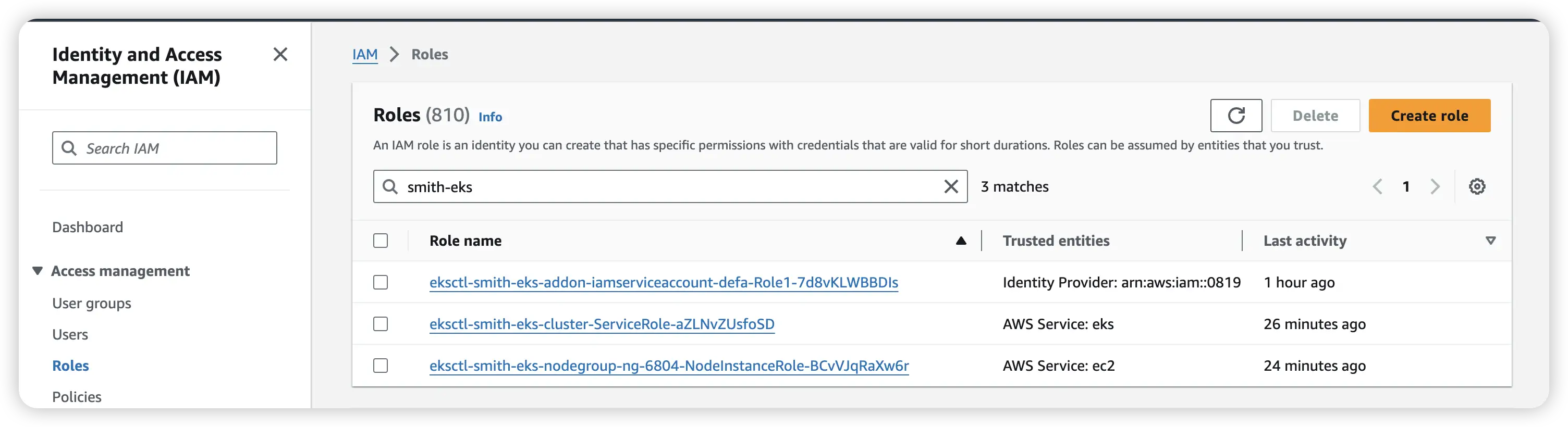
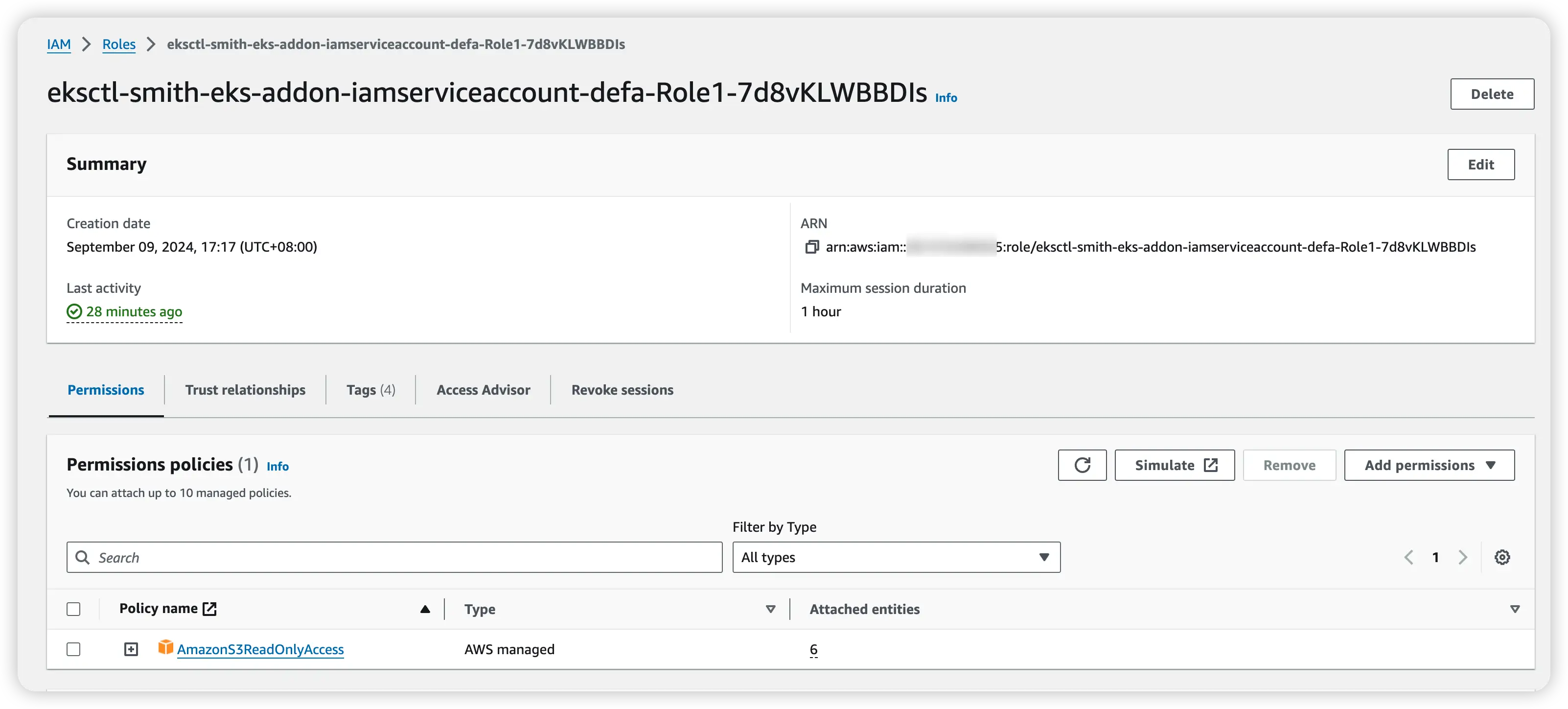
You can see AmazonS3ReadOnlyAccess already attached to eksctl-smith-eks-addon-iamserviceaccount-defa-Role1-7d8vKLWBBDIs
Then we have to change serviceAccount field in values.yaml. For FE & BE, change values from ""->"sr-service-account".
8. Apply new values.yaml
helm upgrade -f values.yaml starrocks starrocks/kube-starrocksCheck all pods are working.
$ kubectl get pods
NAME                                      READY   STATUS    RESTARTS   AGE
kube-starrocks-be-0                       1/1     Running   0          2m6s
kube-starrocks-fe-0                       1/1     Running   0          3m26s
kube-starrocks-operator-d59c86c95-5hhfd   1/1     Running   0          62m
9. Connect with StarRocks
kubectl exec -it kube-starrocks-fe-0 -- /bin/bash

mysql -uroot -h127.0.0.1 -P9030

select * from files(
    "path"="s3://smith-bucket/file.parquet",
    "format"="parquet",
    "aws.s3.use_aws_sdk_default_behavior"="true",
    "aws.s3.region"="us-west-2"
);
Just feel free to use StarRocks, everything is OK.
10. Destroy EKS cluster
After test, we need to destroy EKS cluster.
Delete IAM service account first:
$ eksctl delete iamserviceaccount --cluster=smith-eks --name=sr-service-account --region=us-west-2
2024-09-09 13:12:16 [ℹ]  1 iamserviceaccount (default/sr-service-account) was included (based on the include/exclude rules)
2024-09-09 13:12:18 [ℹ]  1 task: {
    2 sequential sub-tasks: {
        delete IAM role for serviceaccount "default/sr-service-account" [async],
        delete serviceaccount "default/sr-service-account",
    } }2024-09-09 13:12:18 [ℹ]  will delete stack "eksctl-smith-eks-addon-iamserviceaccount-default-sr-service-account"
2024-09-09 13:12:18 [ℹ]  deleted serviceaccount "default/sr-service-account"
Delete EKS cluster:
eksctl delete cluster --name=smith-eks --region=us-west-2 After that, everything is clean.